Warning: Undefined array key "layout" in /home/bateeqjg/public_html/news/wp-content/plugins/wp-about-author/wp-about-author.php on line 94
Here’s a neat guide I found for learning C to Python or Python to C provided by David Brezeale.


Here’s a neat guide I found for learning C to Python or Python to C provided by David Brezeale.
1 2 3 4 5 6 7 8 | // Returns the current page. function getPageURL(){ return 'http://' . $_SERVER['HTTP_HOST'] . $_SERVER['PHP_SELF']; } // getCurrDir() returns the current directory. function getCurrDir(){ return dirname( getPageURL() ); } |
Example:
1 2 | getPageURL(); // returns "http://localhost/live/uploadProductImage.php" getCurrDir(); // returns "http://localhost/live/" |
Here’s an example of jQuizMe.
Goal: Make a quiz for Addition, Subtraction and Multiplication for two digit numbers.
Steps:
Step 1:
I wrote a random number generator in javascript here.
1 2 3 4 | var getRandomNum = function( i, decLen ){ var powOf10s = Math.pow( 10, decLen || 0 ); return i ? Math.floor( powOf10s * Math.random() * i ) / powOf10s : Math.random(); }; |
Or.. you could just use Math.floor( Math.random() * number ).
Step 2 & 3: (Due to time constraints I combined step 2 and 3.)
1 2 3 4 5 6 7 8 9 10 11 12 13 14 15 16 17 18 19 20 21 22 23 24 25 26 | var link = "http://bateru.com/news/2011/04/learn-sig-figs-in-no-time/"; var ops = operations = [ " + ", " - ", " * ", " / " ]; var precision = 2; var arrOfRandomNum = function( arrLength, max, decLen ){ if( arrLength < 0 ){ return false; } var arr = [], i = arrLength; while( i-- ){ arr[ i ] = getRandomNum( max, decLen ); } return arr; }; var makeQuiz = function(){ var quiz = { "fill":[] }; var question = '', nums = []; var i = questionLength = 10; while( i-- ){ nums = arrOfRandomNum( 2, 19 ); question = nums.join( ops[ getRandomNum( ops.length ) ] ); quiz.fill.push({ ques: question, ans: eval( question ).toPrecision(precision) }); } return quiz; } |
Step 4:
1 2 3 | $( "#quiz" ).jQuizMe( makeQuiz(), { intro: ops.join(',') + " quiz.<br>Note: Your answer must have " + precision + " <a href='"+link+"'>sig figs</a>." }); |
Here’s the working demo.
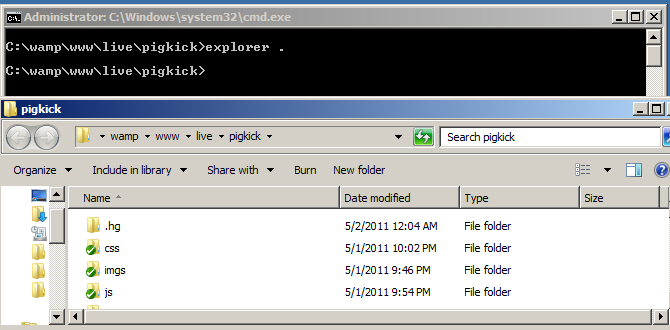
For windows.
When you’re in MS-DOS, type “explorer .” or “start .” to open up explorer (windows file manager) with the current path as the address.